Showing posts with label processes management. Show all posts

Tuesday, August 20, 2013

Resource utilization in Unix like operating system

Uptime:
The uptime shell command is used to get the system overall performence. It will display report in one line that how long system has been started, how many users are currently logged in and system load avarage during last 1, 5, 15 minutes.


Figure 1.Output of uptime


SAR(System Activity Report):
The sar command displays more information of CPU utilization. It displays CPU utilization for specified time. In Ubuntu sar package is not installed. We can install it by using: “root:\sudo apt-get install sar”. The sar command basically looks like “root:\sar seconds time”. Here seconds is used to display CPU utilization in specified time and time is for display report specified number of time. There are some other options available to display other system statistics, are as A, B, b, C, d, e, f, H, h, I, i, m, n, o, P, p, q, r, R, S, s, t, u, V, v, w, y.
Figure 2 Output of sar


PS:
ps command is used to examine the the running the processes. The most useful options is ps -el. Here e specifies every running processes and l options is for generating long list. The output of ps -el looks like as:


meaning of fields in output of ps -el given bellow:
  • S: Shows the process’s current state (running, sleeping, and so forth) . S field takes one of the following values:


1. O— The process is currently executing on a CPU.
2.   S — The process is sleeping, waiting for another event to complete.
3. R — The process is in the run queue (runnable) and is waiting to run.
4. Z — The process is a zombie (it terminated, but its parent has not reaped its exit status).
5.  T — The process is stopped.


  • UID: Lists the numeric user ID (UID) of the user who owns the process
  • PID:  Lists the process’s process ID (PID) .
  • PPID:Lists the PID of the parent process.       
  • C: Shows the CPU utilization of the process.
  • PRI:States the process’s priority (higher numbers mean higher priority) .
  • NI:Shows the process’s nice value (higher numbers mean lower priority) .
  • SZ:Lists how much swap space (virtual memory) the process requires .
  • TTY:Names the terminal on which the process started (also known as the controlling terminal).
  • TIME:Summarizes the total CPU time (in hours and minutes) that the
  • process has consumed .
  • CMD:Displays the command that initiated the process .
 There are some other commands available to check resource utilization.
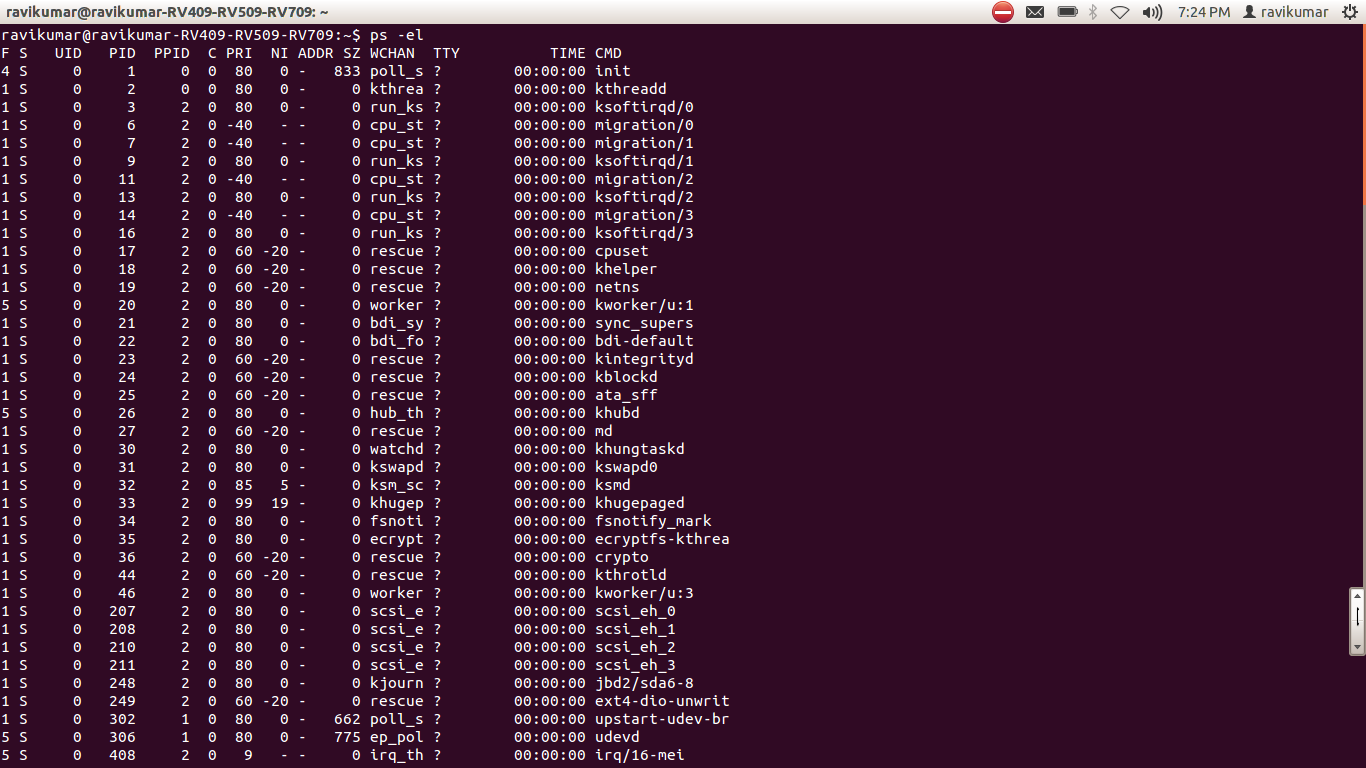

Figure 3. Output of ps -el


Monday, August 5, 2013

Process management


Hello friends, in this blog I am going to write some information regrading process management in Unix like operating system(Ubuntu). Unix like operating system uses different file system compares to windows operating system. There are various process are running currently in operating system as shown in figure 1. this can be seen by using shell command “top”. Following figure 1 shows result of top command.
fig1. result of top command

Process:

Firstly we have to understand what is process, “process is a programm is currently in running”. At the time of process running process may go from various states are as: new born, runnable, running ,waiting, halt etc.

In Unix like operating system process are created by using system call like sys_fork() . Whenever a process is created in Ubuntu(Unix like) operating system firstly create process directory by there process id (pid) or by process name in file system. We can also check which are the process are currently running in the directory: /proc$

Now we are going to check that all running process are really going to create directory in “/procc$”. Look at figure 2 result of top command shows process running currently and also look at figure 3 shows contents of /proc$ directory.we can check the process in this directory by using command “ls”. Result of ls command is shown in figure 3.

fig2.result of top command


In this figure 2 look at the highlighted text shows process that is pid of process is 1575 created by user ravikumar, now look at figure 3 shows directory created by process id 1575 is highlighted.

fig3. contents of /proc$


Now the question arises that what is contained in this directory “1575” ? this directory contains details of process such as memory used by process, list of opened files by processes, cpu status, environmental variables, scheduling information, io devices used by process etc.

One more point i have to discuss regurding processes is “how much of the process can be created in unix like operating system can you guess”. OK don’t worry I will tell that maximum process process that are allowed to create are 32767. this is not complete discussion about process management.