Showing posts with label networking. Show all posts

Sunday, August 4, 2013

HACKER'(s) TOOL - ETTERCAP


 Learn Open Source Networking tool "Ettercap". Ettercap works as a mediator attack between user and the server. Ettercap is there for windows XP as well as different versions Linux, but it works more efficiently in 
1. Fedora
2. Gentoo
3. FreeBSD
4. NetBSD
5. OpenBSD

Overview:
1. DNS spoofing
2. ARP poising
3. DOS attack (PLUGIN)
4. SSL attack

This tool can be used for good purposes as well as for negative one. This tool is very useful for ethical hackers. Hacking in ethical environment needs the base of suspects MAC address, IP address and PORT address. Any combination of this three attributes forms a secure private Lan network. To break this network Security, Hacker needs to deal with this three attributes and play with them. But how to get these information?. Here comes the role of "ettercap". It is really a powerful tool.

ARP (Address Resolution Protocol) poising:
This technique sends a fake spoofed (ARP) messages in the discoverable LAN environment. This attack is used to get the MAC address and IP addresses. This technique is really help full to start getting the information. As it sends a spoofed (message) in the network, the systems active and discoverable in network will respond.

DNS spoofing:

In DNS spoofing you just need to edit a config file that defines which IP addresses to be resolved.

SSL (Secure Sockets Layer):
It is a crystallographic protocol that provides communication security over the internet. Using ettercap we can break or enter into this layer.

Searching Host:

To start the attack or search of the suspect or destination node in the network select the host option and search the available host.
Setting Target:

After getting the resolved IP and MAC addresses, select number of targets.
Using it in Windows command prompt :


How to start ettercap?

It is an open source tool to use. Download and install it from installation manager. After installing it open it and type in prompt "ettercap -G".

This tool is open source and can be used for good as well as wrong purposes. Better we use it for study purposes.

Sunday, February 24, 2013

Socket Programming in JAVA

Socket is a logical entity in a computer system which provides communication mechanism between two computers using TCP (transmission control protocol) or UDP (user data-gram protocol), but in this blog we will be studying communication over TCP. Socket is combination of IP address and port. The java.net package contains classes that provide all of low level communication for you. To create socket there is Socket class available in java.net package and the java.net.ServerSocket class provides a mechanism for server program to listen for client and establish connection between them.

Steps to establish communication using socket over TCP:

1.Server initiate Server socket object indicating on which port communication will take place i.e. server decides port on which communication takes place.
2.The server invokes the accept() method of the ServerSocket class. This method waits until client connects to server on the given port.
3. Then client initiate socket object specifying IP address or name of server and port number on which communication will takes place. Communication will takes place only when server is listening to same port.
4.After this it can be possible to communicate on a socket.

After following above steps communication can be done using I/O streams. TCP is a two way communication protocol. Both client and server has input and output stream. Client output stream is connected to input stream and Client output stream is connected to server output stream. There are various socket primitives available in ServerSocket class.

Socket primitives:-

There are a lot of primitives available but we will be discussing only two which is required to establish simple communication over socket.

      public ServerSocket(int port):

This primitive in server decides on which port communication will take place. We can say that it binds the port address by creating socket. Sometime this primitives throws I/O exceptions.

       public Socket accept():

This primitive in server continuously waiting for client to get connect on the specified port in above primitives. This method also throws I/O exceptions.
           
Example :-

For client:
import java.net.*;
import java.io.*;
public class socketclient {
public static void main(String[] args) {
                        Socket s=null;
                        try
                        {
                                    s = new Socket("localhost",30000);       
                        }
                        catch(UnknownHostException uhe)
                        {
                          uhe.printStackTrace();
                        }
                        catch(IOException ioe)
                        {
                                  ioe.printStackTrace();   
                        }
                        System.out.println("Connected Successfully");
                        BufferedReader in = null;
                        PrintWriter out = null;
        try
        {
             in=new BufferedReader(new InputStreamReader(s.getInputStream()));
             out=new PrintWriter(new OutputStreamWriter(s.getOutputStream()));
             System.out.println("Start Communication now -->>");
             while(true)
             {
       BufferedReaderreader=newBufferedReader(newinputStreamReader(System.in));
             String name=reader.readLine();
             out.println(name);
             out.flush();
             System.out.println("Server says:->>"+in.readLine());
             if(in.readLine().equals("exited") | in.readLine().equals(null))
             {
                         s.close();
                         break;
                         }
             }
        }
        catch(IOException ioe)
        {
        ioe.printStackTrace();          
        }
           
            }

For server:
import java.net.*;
import java.io.*;
public class socketserver {
            public static void main(String[] args) {
                        ServerSocket ss=null;
                        Socket server = null;
                        int port=30000;
                        try
                        {
                                    ss=new ServerSocket(port);
                        }
                        catch(IOException ioe)
                        {
                                    ioe.printStackTrace();
                        }
                        System.out.println("listening 0n "+ port);
                        try
                        {
                                    server=ss.accept();
                        }
                        catch(IOException ioe)
                        {
                                    ioe.printStackTrace();
                        }
                        BufferedReader in = null; 
            PrintWriter out = null;
        try
        {
            in = new BufferedReader(new InputStreamReader(server.getInputStream()));
            out = new PrintWriter(new OutputStreamWriter(server.getOutputStream()));
           while(true)
            {
            String clientCommand = in.readLine();
            if(clientCommand.equals("exit"))
            {
                        System.out.println("Connection is disconnected from the user Messege :EXIT");
           out.println("exited");out.flush();
                        server.close();
                        break;
            }
             System.out.println("Client Says :-->>" + clientCommand);
             System.out.println("Server Says:-->>");
       BufferedReaderreader=newBufferedReader(newInputStreamReader(System.in));
             String name=reader.readLine();
             out.println(name);
             out.flush();
            }
       }
        catch(IOException ioe)
        {
            ioe.printStackTrace();
        }
}
}

Sunday, September 16, 2012

Reducing Traffic in LAN


There are various reasons available why traffic increased in network. We know that less number of packets available on network then packet transferring speed is better. So we have to reduce traffic in network. I am just interesting in reducing traffic in LAN.


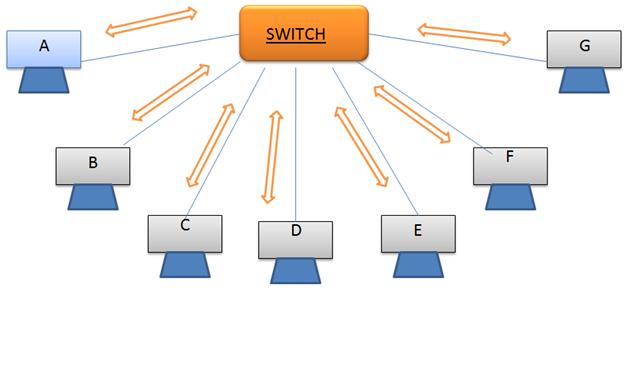
Fig 1.Normal working of switch transferring packet from A to G
When a packet is transferred in LAN network it first passes to switch. Then switch broadcast these packets to all available links connected to switch. Switch makes multiple copies of an incoming packet and then broadcast in network. Then each system receives packet in LAN and checks for an IP address is packet having IP address of its own or not. If yes then it receives packet otherwise it discards the packet. Switch does not use any statistics algorithm to send packet on only one link which gets delivered to destination, rather than system have to check address on packet.

These above stated reason causes increase in traffic of LAN. Now how to reduce traffic in LAN. The concept is just needed like as router in network. We know how router works for sending packets to destination. Router maintains a routing table containing list of all IP address associated with router. As like router we have to maintain a table in switch for storing IP address associated with each system connected to switch. For that purpose, we have to add a temporary memory device like RAM which contains routing table.

Now if a packet gets received to a switch it get forwarded on only those links where is destination system. As it transfer packet to only on one link number of packets (traffic) get reduced, this causes fast data transfer.

Fig 2 .transferring packet from A to G