Showing posts with label switch. Show all posts

Saturday, August 30, 2014

Learn How to share internet in LAN in Windows 8.1 with pictures


Hello Folks, as we know new Operating system comes into picture after every short period of time. So, sometimes it may happen that visual aspects may change. In windows 8.1 same problems is faced by number of windows user. So, let’s overcome this problem statement of how to share internet in LAN in windows 8.1.

Just Follow the Pictorial and description regarding this problem.

Now, remember you must be having a single computer as main login for internet and that computer must be connected to a switch or a router or a hub. So, connect the LAN cable on the same device of network computers.


Sunday, September 16, 2012

Reducing Traffic in LAN


There are various reasons available why traffic increased in network. We know that less number of packets available on network then packet transferring speed is better. So we have to reduce traffic in network. I am just interesting in reducing traffic in LAN.


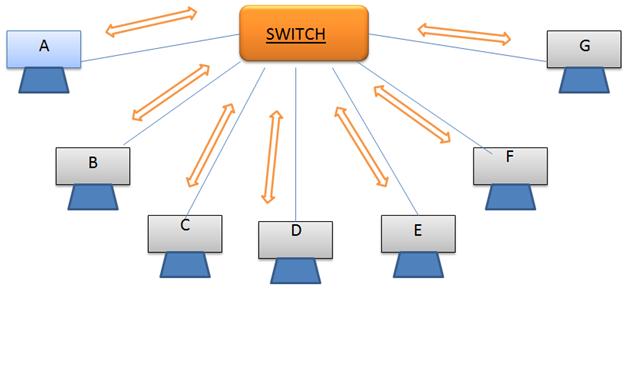
Fig 1.Normal working of switch transferring packet from A to G
When a packet is transferred in LAN network it first passes to switch. Then switch broadcast these packets to all available links connected to switch. Switch makes multiple copies of an incoming packet and then broadcast in network. Then each system receives packet in LAN and checks for an IP address is packet having IP address of its own or not. If yes then it receives packet otherwise it discards the packet. Switch does not use any statistics algorithm to send packet on only one link which gets delivered to destination, rather than system have to check address on packet.

These above stated reason causes increase in traffic of LAN. Now how to reduce traffic in LAN. The concept is just needed like as router in network. We know how router works for sending packets to destination. Router maintains a routing table containing list of all IP address associated with router. As like router we have to maintain a table in switch for storing IP address associated with each system connected to switch. For that purpose, we have to add a temporary memory device like RAM which contains routing table.

Now if a packet gets received to a switch it get forwarded on only those links where is destination system. As it transfer packet to only on one link number of packets (traffic) get reduced, this causes fast data transfer.

Fig 2 .transferring packet from A to G