Showing posts with label Database. Show all posts

Tuesday, March 31, 2015

MongoDB find() and findOne() methods


     In  MongoDB CRUD operation find() and findOne() methods are used to read a documents from the collections. Lets study this methods with example. 

1. find() : 
                  The most basic operation to query documents out of the database is called find(). MongoDB find() method returns all documents present in the database.
 For example, Here I have student database and collection name is grades which has 800 documents. After executing this query it returns first 10 documents and it ask for next 10 documents. If you want more documents type "it" next 10 documents will get display.

    find() method can take some arguments. You can filter result by adding search criteria. For example in "grades" collection there are "homework","quiz" and "exam " type of documents. If I want only "exam" type . The query will be db.grades.find({''type'' :''exam''}).


       We can also add multiple fields in criteria but both the criteria should match. Like here I have selected students with type :exam and you can also include and exclude fields if you want by making field name true or false, here I excluded object id field.


  2. findOne():

 This method also retrieves the data but it returns only one document at a time. Lets see following example fineOne() without argument returns very first document from the collection.


  We can also add criteria in findOne() method like find() method. In following example only document with the "student_id" : 112 is return as specified in criteria.


Saturday, September 20, 2014

MongoDB CRUD Operations

               
       MongoDB CRUD stands for Create, Read, Update, Delete. MongoDB provides rich semantic to communicate with the database. MongoDB CRUD operations are much similar to SQL create,select,update and delete operations. If you already work with SQL you will find it very easy to understand and if your not then still you will find it very easy! OK, before moving forward to CRUD operation we have to understand how MongoDB stores data. As we know MongoDB is document oriented database it stores the data in the form of documents.
      So no rows and columns. It uses JSON(JavaScript Object Notation) like format to store data. Formally, MongoDB documents are BSON documents. BSON is a binary representation of JSON with additional type information. following image is example of MongoDB document.

     Above document shows fields and values which is much similar to the relational database table but MongoBD uses dynamic schema means you not need to specify datatype, fields before entering data into database such as relational database management system. Following image is example of tabular database.
 In MongoDB there are collections instead of table. In MongoDB database contains number of collections MongoDB stores all the documents in collection. Collection is a group of related documents that have a set of shared common indexes.

Now lets see MongoDB CRUD operations, Mainly include MongoDB read operation and Write operation. It contains some important points such as Cursor, query optimization and distributed queries but we will perform simple operations first for better understanding.
    We will perform the tasks in following order :
  1. Create 
  2. Insert 
  3. Read 
  4. Update 
  5. remove
       Before start performing this operations we have to setup environment means making connection between "mongod" server and "mongo" client. If you don't know how to startup mongo shell then read my previous blog "Downloading and installing MongoDB on windows" 

1. Create:
   lets start from creating database in MongoDB. Now what you have to do is just enter following command on mongo shell,
   Syntax:
          use databasename
  Example:
        use blogdata 
   Database is not created unless you not inserting documents in it.


2. Insert:
     To write into database following syntax is used,
 Syntax:
             db.collectionname.insert({ document to be inserted});

      You can use any other folder name instead of "db" if you want.You don't have to create collection separately. It will automatically get created.
 example:


        To see the document that you have inserted run this command "db.collectionname.find()", "collectionname" should be the same which you have used earlier to insert document.


  3. Read:
           To read data from the database following command is used,
   Syntax:
                 db.collectionname.find();
    By using this command documents will get displayed, you can be more specific by writing some criteria in find(), by default it will display all documents that contains in collection. But if you want to get specific document then Mongo provides way to write more optimized query you can use :

  • Limit the cursor means you can limit the number of result you get which matches criteria.
  • Can add projections means you can specify which fields you want in result.
  • Can add query criteria 

    Example: 
                      
     This query returns documents in which age is greater than 18. It will display only name and address field because it is specified as "1" if field is "0" then mongo does not display that fields in result. Look at following SQL query which gives same result as mongo query for more better understanding.

         
    4. Update: 
           Update operation is used to modify the documents,
       Syntax:
                  db.collectionname.update({ criteria})
       Example:
            Following query will update the document field "status" as "A" where field "age" has value greater than "18".

     Following SQL query gives the same result as mongo.

     
   5. Remove: 
        Remove operation is used  to delete documents from database,
     Syntax:
                      db.collectionname.remove({criteria})
     Example:
         Following query will remove the documents where "status" field is "D".


   See the SQL query for same operation, 

Friday, September 5, 2014

Downloading and installing MongoDB on windows

        Downloading and installing MongoDB is very simple and easy. Before you download MongoDB for your Windows you should know which version of Windows you’re using and to run MongoDB on your system also make sure that you’re using windows newer version than Windows XP.
    To check which version of Windows your using enter following command in terminal:-
wmic os get osarchitecture
It will show your windows architecture as shown in below image:-


Downloading and installing MongoDB involves following three steps:-
1.     Download zip file
2.     Extract the file
3.     Setup the environment 


Monday, August 25, 2014

Types of NoSQL databases

Hello everyone, in my last blog “NoSQL” I have just listed different categories of NoSQL databases. Now let’s see it in details one by one.
  1.  Key value store
  2. Document store
  3. Column Family store
  4. Graph based


1.     Key value store:
·        This type of model is the most simplest and easiest to implement. The main idea here is use of hash table in which there exist a unique key and a value associated with it.
·        There is no complexity around the key value store data model as it can be implemented very fast and easily.
·        The key can be synthetic or auto generated while the value can be string, JSON, BSON etc.
·         It is schema free and your value is stored as a key eg. In one column you will be having key “Name” and value would be “Kaveri” and in the second column, it’s not necessary mean that you must have the value of name again; it could be different kind of data in the same column in different row.
·        Following table shows the example of key value store data model :
key
Value
“India”
{“09, Sai Anand App, Gangapur Road, Nasik 422013 ,India”}
“US”
{“3975 Fair Ridge Drive. Suite 200 South, Fairfax, VA 22033″}
“CA”
{“47112,warm springs blvd #103 Fremont, CA, United States 94539”}

·        This key/value type database allow clients to read and write values using a key as follows:
§  Get(key): returns the value associated with the provided key.
§  Put(key, value): associates the value with the key.
§  Multi-get(key1, key2, .., keyN): returns the list of values associated with the list of keys.
§  Delete(key): removes the entry for the key from the data store.
·        Example of key value store databases are: Memcached, Coherence,  Redis ,Riak and Amazon’s DynamoDB are the most popular key-value store NoSQL databases.
2.     Document store:
·        These kinds of NoSQL databases are very interesting because instead of rows and columns data is stored in documents, this semi structured data is simply stored in JSON, BSON.
·        Document database were inspired by Lotus and are similar to key value store. The model is basically documents that are collection of other key value collections.
·        Document databases are next level of key value. It supports querying more efficiently.
·        Document database would look like,


·        Example of  document databases are: Mango,CouchDB,Cloudant.
3. Column family store: 
·        Column family types were created to store and process very large amount of data distributed over many machines.
·        This type of NoSQL databases are not schema free. They are kinds of semi structured database which means you need to specify a group of column in these databases and they are called column families.
·        There are still keys but they point to multiple column arranged by column family.
·        A column family database can have different column on each row so is not relational and doesn’t qualifies in an RDBMS as a table
·        The implementation of column family much similar to the Google’s BigTable .
·        Colum family work better with complex dataset.
·        Example of column family databases are BigTable,Hbase,Accumulo.
4. Graph databases:
·        Instead of table of rows and columns and fixed structure of SQL, a flexible graph model is used which can gain scale across the multiple machines.
·        Graph structures are used with edges, nodes and properties which provides index-free adjacency. Data can be easily transformed from one model to the other using a Graph Base NoSQL database.
·        Graph database takes the document database to the extreme by introducing the concept of type of relationship between document and nodes. For example relationship present between the people on social network such as Facebook.
·        It uses sophisticated shortest path algorithm to make data querying more efficient.
·        Although it is slower than its other NoSQL counter paths a graph database can have the most complex structure and still traverse billions of nodes and relationship with light speed.


·        Example of graph databases are: Neo4j,Sones, InfiniteGraph, AllegroGraph, OrientDB, InfoGrid

Tuesday, August 19, 2014

NoSQL Databases

       NoSQL is next generation DBMS which is used to store and retrieve the data which does not have specific format or table like structure. NoSQL database is also called as “Not only SQL” to emphasize that it does not use SQL language but It uses SQL-like language. The original intension has been modern web scale databases. The movement began in early 2009 and growing rapidly. NoSQL databases are mostly addressing some of the points:-
·         Non-relational
·         Distributed
·         Open source
·         Horizontally scale

          As we Know there are different types of Database Management System and RDBMS is most commonly used database management system. If we go back in history, first flat file systems were created then in 1970's Codd came up with Relational theory and based on that relational databases were developed. The problem was that in flat file system there was no standard way of storing data and no standard way of communicating with data. Everybody has implementing their own protocol and that was creating lots of inefficiency. So relational database standardized the way we communicate with database. Then life moved on and everything was going well and suddenly, we entered into Big data scenario. Relational databases are unable to handle huge amount of data so the answer was “NoSQL”. So NoSQL was created because of limitations of relational databases.
     The data is structured in relational databases. We have to define table structure in advance, we have to tell the system in advance like table will have 10 rows and 10 columns and each column will take particular data type and this would be the maximum value one can enter and so on. This way we can't handle unstructured data where there is no fixed format or format is always changing. So NoSQL handles both structured and unstructured data.
-NoSQL focused to provide:
·         Scalability
·         Performance
·         High Availability
·         Simple API
·         Schema free
·         Easy replication support
·         Eventually consistent(not ACID)
      NoSQL can handle large amount of data.  As data is keep on growing it provides scalability and high availability in terms of hardware failure. Ability of NoSQL is to handle large amount of data with amazing performance with comparison they offers less functionality than RDBMS.

     NoSQL is category which can be commonly further divided into three categories given below with example:
·         Key Value Store : Memcached,Coherence, Redis
·         Tabular : BigTable,Hbase,Accumulo
·         Document oriented : Mango,CouchDB,Cloudant
If you search you will find more categories. Here is the list of some:
·         Column store/Column family
·         Document store
·         Key value store/Tuple sore
·         Graph database
·         Multimodel database
·         Object database
·         Grid and Cloud solution
·         XML database
·         Multidimensional database
·         Event sourcing
·         Network model
·         Other NoSQL related databases
·         Unsolved and uncategorized

      So what is missing from NoSQL databases if you compare them with relational databases? Well Joins are not there because of this joins relational databases are not so scalable. So in NoSQL databases this functionality is not implemented hence scalability and performance comes in. The support for complex transaction is not there for example you can’t not do insert three records then update two records and check something if it’s not then rollback everything. Again constraint support is not there. Transaction support and constraint support is not there on database level but transaction support and constraint support can be applied on application level.

 What are the situations or scenarios where one can use NoSQL database?
·         The ability to store and retrieve great quantity of data is important.
·         Storing relationship between elements is not important.
·         Dealing with growing list of elements, example: Twitter post, Internet server logs, Blogs.
·         The data is not structured or the structure is changing with the time.
·          Prototype or fast application need to be developed
·         Constraints and validation logic is not required to be implemented in database.
What are the situations or scenarios where not to use NoSQL database?
·         Complex transactions need to be handled
·         Joins must be handled by databases
·         Validations must be handled by databases


Tuesday, September 17, 2013

ADODC connectivity

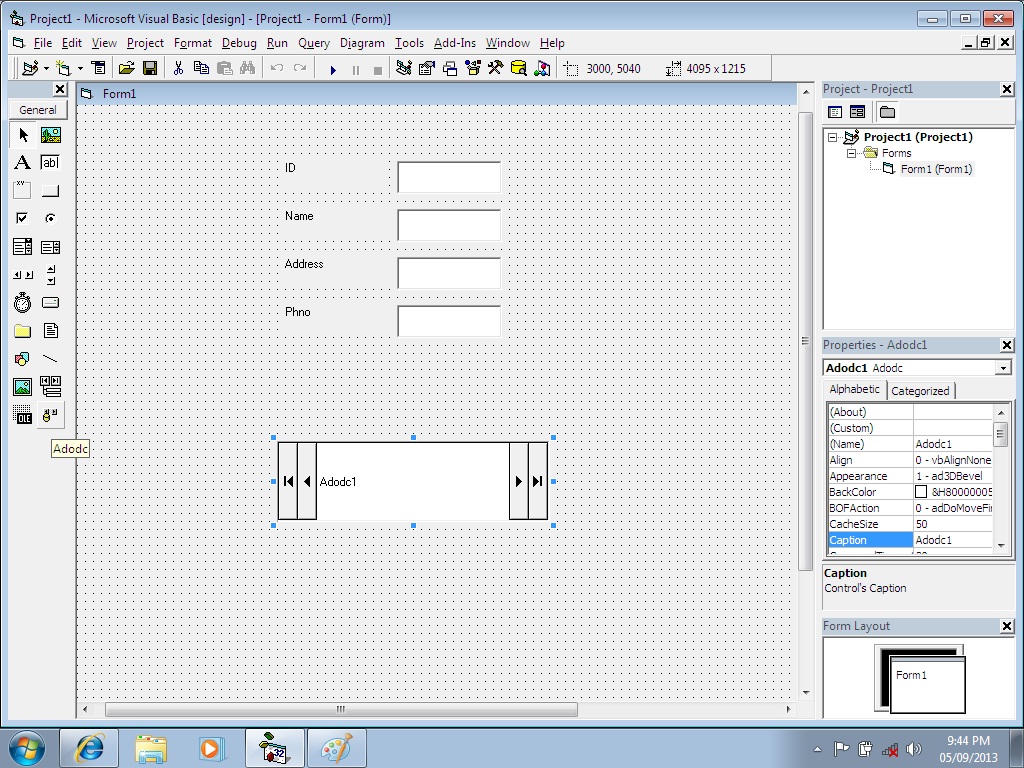
Hello friends, in this blog we are going to study how to connect Oracle database with Microsoft’s Visual Basic. To do it we must have installed Oracle and Visual Basic (VB). If it is not installed then please get it install. Now to connect VB with Oracle, Oracle must contain at least one table. Further process is explained step by step: Design form in VB as shown in figure, form must contain one text box box for each field in table in Oracle.
  • Design form in VB as shown in figure, form must contain one text box box for each field in table in Oracle.
  • You have to add component in VB: right clicking on toolbox select option component, it will display new window containing three fields. From these three fields select “Controls” and from them select component named “Microsoft ADO data control(OLEDB)” then apply it then click on OK as shown in figure 1. It will add new component in tool box.
Figure1.Adding ADODC component
  • Click on this control and put it on form as shown in figure 2.

Figure2. Form design and ADODC control
  • Now open control panel from start button select administrative tool, it will display list from them select “Data source (ODBC)”. It will display ODBC data source administrator window shown in figure 3.
    Figure 3. Creating Data source
    • From that click on add button it will display new window for creating new data source.
    • From that select your database which is installed previously that is Oracle. I have installed Oracle XE that’s why I am selecting it as shown in figure 3.
    • After that it will display configuration window where you can specify data source name and you can test connection by clicking on test button. For testing connection it will ask for service name, user name and password which is of we have set to oracle. And after that click on OK button it will display message “connection successful” as shown in figure 4.
      Figure 4 Configuring data source
     
  • Now come to VB right click on ADODC control and select properties, it will display new window. From that window select second option “Use ODBC data source name” from general tab. From that select data source name which is created previously from administrative tool as shown in figure 5.
  • Now click on second tab “Authentication” in that enters user name and password provided to Oracle as shown in figure 5.
  • Now come to third tab “Record source”, in that enter query which you want to perform. I am entering select as shown in figure, and then click on apply and then OK as shown in figure 5.
    Figure 5 ADODC component property
     
  • Now click on text box and go to property and click on Data source as ADODC which is already there and Data field which data you want to display in that text box. Do this for all text box as shown in figure 6.
    Figure 6 Property window of text box
    Now you can run your project. It will by default display first record from table in text boxes. You can see next, previous record by clicking on ADODC control next and previous button as shown in figure 7.
    Figure7.Run project

Monday, September 16, 2013

Introduction to PHP and its basic syntax

Hi friends, today we will see introduction to PHP and its basic syntax. Prerequisite to understand this blog is to read my previous blog on XAMPP server.
PHP is the recursive acronym for PHP: Hypertext Pre-processor. PHP was developed by Rasmus Lerdorf and now it is maintained by The PHP Group. It is an open source server side scripting language. Pre-requisite for learning PHP is HTML. PHP code can be embedded inside HTML code. PHP is mainly used for web development. Everything in PHP is enclosed in angle brackets
“<?php ……………..?> “.
PHP allows writing web pages which are dynamically generated. When a user visits any of the website which has PHP webpage’s, then a web server processes the PHP code and translate it into HTML page and then send to the requesting client.
PHP’s syntax is very similar to C, Perl, Java beside this PHP code can also contains tags.
PHP code is:
<?php
------
------
?>
PHP code must be saved with the .php extension. We will now see a simple Hello World program written in PHP which will give us basic understanding about the syntax of PHP that we must use.
This simple code is saved in the xampp directory where the path is C:\xampp\htdocs\hello_world.php. We have seen xampp in our previous blog, so start apache server there. And then go to web browser and type localhost/Hello_World.php.
Output:
There are several things to learn from this simple code written above. As we can see, code which is red in colour is the starting and end point of php code. Everything will be inside this code always. Now see line 2, echo is used to print the statement that follows, be careful here to end the statement with semicolon (;).
This is the first blog on PHP and in coming weeks we will learn more about this dynamic language.

Thursday, February 28, 2013

BigTable used by Google

In the world of cloud computing and many web based applications, the most essential is a database that can accommodate a large number of details of large numbers of users. Traditionally relational databases present a view that is composed of multiple tables, each with rows and named columns. And the queries mostly performed in SQL allow one to extract specific columns from a row where certain conditions are met. In traditional database, ACID properties i.e. atomic, consistent, isolated and durable are the main aspects. But many times it is impossible to guarantee consistency. So the ACID properties of database make uncomfortable for highly distributed environments. So the alternative storage system that highly distributed environments like Google used is BigTable.
 
BigTable is a distributed storage system that is structured as a large table that may be petabytes in size and distributed among thousands of machines. BigTable is described as a fast and extremely scalable DBMS (database management system). BigTable is a compressed, high performance and proprietary data storage system built on Google File System, Chubby Lock Service, SSTable and a few other Google technologies. But it is just used by Google and is not distributed outside Google although Google allows access to it as a part of Google App Engine.
 
                                                  Fig 1: Google BigTable
BigTable development was started in 2004 and now it is widely used by the Google applications such as web indexing, Google Reader, Google Maps, Google Book Search, Google Earth, Blogger.com, Orkut, YouTube, Gmail etc.
BigTable maps two arbitrary string values (row key and column key) and timestamp, hence three dimensional mapping into an associated arbitrary byte array. There can be multiple versions of a cell with different timestamps. In order to manage the huge tables, BigTable splits the tables at row boundaries and saves them as tablets. Each tablet is around 200MB, and each server serves about 100 tablets. This set up allows tablets from a single table to be spread among many machines. It also allows for load balancing, because if one table is receiving many queries, it can move the busy table to another machine that is not so busy. Also if some machine goes down, tables may be spread to other machines so that performance of all given machine is minimal. Tables are stored as immutable SSTables and logs of all the machines. When machine’s system memory is full, it compresses some tablets by using Google proprietary compression techniques such as Zippy and BMDiff. The locations of BigTable tablets are stored in cells. The particular tablet is handled by three-tiered system.
                                                                                                                                                                                     
                       
                                                     Fig 2: BigTable Architecture
BigTable is not like a relational database and can be defined as a sparse, distributed multi-dimensional sorted map.

Sparse:  The table is sparse which means that different rows in a table may use different columns, in which many of the columns that are used may be empty for that particular row.

distributed: BigTable’s data is distributed among many independent machines. As in Google, BigTable is built on top of Google File System.

sorted: In BigTable, a key is hashed to a position in a table. BigTable sorts its data by keys. This helps to keep the related data close together on the same machine.

Google has built its own database storage system for the reason of scalability and better control of performance characteristics.