Showing posts with label open source. Show all posts

Tuesday, March 31, 2015

MongoDB find() and findOne() methods


     In  MongoDB CRUD operation find() and findOne() methods are used to read a documents from the collections. Lets study this methods with example. 

1. find() : 
                  The most basic operation to query documents out of the database is called find(). MongoDB find() method returns all documents present in the database.
 For example, Here I have student database and collection name is grades which has 800 documents. After executing this query it returns first 10 documents and it ask for next 10 documents. If you want more documents type "it" next 10 documents will get display.

    find() method can take some arguments. You can filter result by adding search criteria. For example in "grades" collection there are "homework","quiz" and "exam " type of documents. If I want only "exam" type . The query will be db.grades.find({''type'' :''exam''}).


       We can also add multiple fields in criteria but both the criteria should match. Like here I have selected students with type :exam and you can also include and exclude fields if you want by making field name true or false, here I excluded object id field.


  2. findOne():

 This method also retrieves the data but it returns only one document at a time. Lets see following example fineOne() without argument returns very first document from the collection.


  We can also add criteria in findOne() method like find() method. In following example only document with the "student_id" : 112 is return as specified in criteria.


Wednesday, March 19, 2014

Geany Editor


Open Source has contributed with may of the applications that are useful to the people and specially programmers. Geany is one of the applications that is much used now a days. It is just like an IDE that enables a user to run multi ingustic programs using one editor. It has an inbuilt compiler which detects the type of code you are writing and compiles the code. We will be seeing the basic code of C.

Wednesday, December 11, 2013

Wireshark: One Of The Best Open-Source Packet Analyzer

Wireshark is a free and open-source packet analyzer. It is used for network troubleshooting, analysis, software and communications protocol development, and education. It is the network analysis tool which is called as “Ethereal”. Wireshark captures packets in real time and displays them in human-readable format. Wireshark includes filters, color-coding and other features that let you dig deep into network traffic and inspect individual packets.


Fig1: Logo Of Wireshark

Saturday, June 15, 2013

OpenPDroid – Protect your Privacy in an Android Phone

Whenever we download an application from the Android Play Store, it shows us the permissions the applications uses. Many applications access our data like, location, usage statistics, contacts, messages, phone numbers. Even if we don't want to share a particular data with the application due to privacy concerns, the only way not to share data is to uninstall the application. We can also provide fake data to the application. But HOW?
         
OpenPDroid helps protect your privacy by providing real, fake, null or random data based on our preferences. We can configure OpenPDroid for each and every application installed on our device, so we can configure what data to share with various applications. For example, if we have set our preference as to provide location as 'Mumbai' for Facebook app, then even if we are in USA, Facebook will only get location as 'Mumbai'. Fascinating, isn't it?

PDroid Manager Application Interface
PDroid Manager Application
         
         
Description of OpenPDroid from the developer:

“OpenPDroid is a set of modifications to the Android framework and libraries which allows fine-tuning of the data which applications are able to retrieve about your device, your account, your messages, and more.”

“OpenPDroid intervenes in API interactions by apps (e.g. when an app attempts to retrieve your location, phone number, or contacts) and provides real data, empty data, fake data or random data, depending on the user setting.”

As OpenPDroid just modifies the data requested by the app without modifying the permissions of the app, there is very less chance of getting undesired effects like Force Close of app, etc. OpenPDroid supports Android versions 4.1.2 and 4.2.1, and is also completely open-source.

Permissions of Google Chrome on Android
Permissions of Google Chrome

         
This actually needs modification of Android framework and hence is hard to implement on a particular Android OS you already have, and is not as easy as installing an app. This mod should be added to Android ROM when the ROM is compiled from source. There also is a tool named auto-patcher for implementing the mod in an existing ROM. The tool is available for Windows, Linux and Mac OS X.
         
Though implementing OpenPDroid requires much effort, it is well worth, if you are concerned about your privacy from the big list of permissions required by various apps you use.

For more information, you can refer to: OpenPDroid

Tuesday, June 4, 2013

X-RAY Goggle by Mozilla


Now a days, web programming is most popular among us and web programming also has large scope, so people who want to be web programmers they are attracted towards the web programming but it’s not so easy for newbie’s, because they have to start from the beginning that they hate a lot. But what can anyone do, they have to learn the basics first, then and then they can move forwards to advance web programming.
For newbie’s learning basics is a better choice but it takes time to understand everything about web designing and formatting. But web programming take new steps every day, in this situation it's quite difficult for newbie’s to match with the programmers who are gamblers of coding.
But when there is a will there is a way, Mozilla introduces their open source software X-Ray Goggle that can help the programmers to do anything without coding, you just have to make changes in existing coding and you are done. Many people say that it's a hacking and it's wrong thing to do, but people have miss concepts related to hacking. Hacking is not wrong thing to do, if you have any problem regarding your web programming and you come out with solution through Mozilla X-Ray then it's called as hacking and it's good thing to do.
Now, you will think we have many software on Internet from which we can do the same things, so why go for X-Ray Goggle. First thing is that it is open source, so no need to pay anything to anyone. Second is that it is quite easier to learn and apply on your web page. I had learned about this software in Mozilla workshop held on 6th March 2013 at N.D.M.V.P college of Engineering by Ankit Gadgil.
Following are the steps for installing X-Ray Goggle and how to work with it.

Step 1: Go to http://hackasaurus.org/en-US/goggles/ to download it. Downloading X-Ray Goggle is really simple.
 
Fig:01

Step 2: As you can see on Web site of X-Ray Goggle to install it just drag and drop it on your toolbar as shown below.
Fig:02(a)

Fir:02(b)
Step 3: Open any website on which you want to make changes. I am changing the image on Google.com, for that you have to copy the image location of other image which is going to be replace, for that just go on Google.com and search any image, open it and right click on image and select option “copy image location”. Now the image location has been copied then go to the website where you want to make changes.
Fig:03

Step 4: Click on X-Ray Goggle option on toolbar and move cursor to the Google image.
Fig:04
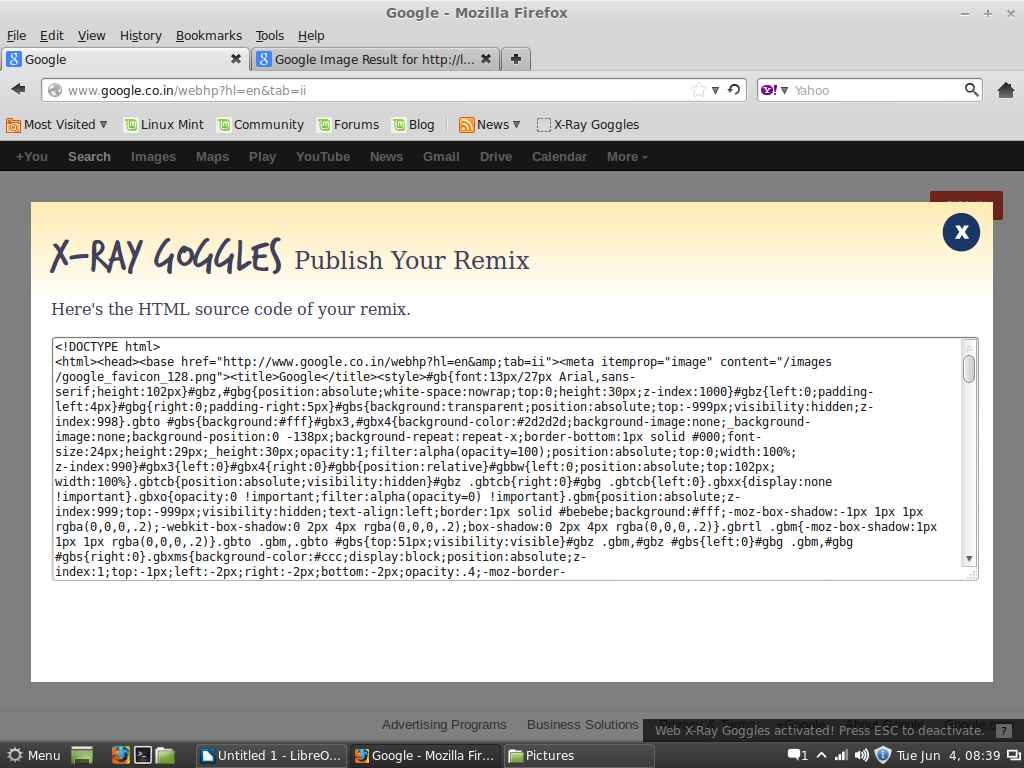
Step 5: Now click on the image, after clicking on image you will get the source code of that image just replace that image URL with the URL you have copied before.
Fig:05

Fig:06

Fig:07
Step 6: After replacing the image URL the actual image will be changed as you can see, after that just click on commit button and the changes will appear on actual page as well. This changes are temporary so you can do two things either you can publish it on Internet or you can view a source code of it and save it, or both can be done.
Fig:08

Fig:09

This one is a small example of X-Ray Goggle, you can use it as you like and add that codes to your own page.

Monday, February 25, 2013

GnuNify 2013s

Day I:-
It was really an awaiting moment to all techies of Open-Source World to be at GnuNify 2013.It was held at Symbiosis Institute of Computer Studies and Research (SICSR). After an Inauguration Ceremony of GnuNify at day 1, six sessions were scheduled parallel with respect to domains such as Jump Start, FOSS General, Web-Technologies, Programming, Wikipedia, Mozilla Meetup, Cloud Computing, Sys Admin, Mobile-Tech and Localization. I attended the Jump Start Session by Oyunbileg Baatar on “Screencasting Demos and HowTos”. It was practical Hands On Session on How to create a video tutorials and upload it on web by using open-source tools like recordmydesktop and pitivi. Parallely, Prof. Tushar Kute attended the session of Cloud Computing on “Introduction to Open Stack Project” By Atul Jha. Further he also attended the session of “Storage as a Service and Cinder” by Sajid Akhtar and “Introduction to Open Stack Quantum” by Vivek Raghuvanshi. All the three sessions elaborated an Idea of Open Stack to him. Whereas Prof. Amol Kute attended his first session of Sys admin on “Open SSL Architecture Interface and Internals” by Saifi Khan. After my first session I attended the Programming Session on “TC to GCC Transfer Certificate” by Shakthi Kannan. It was a Practical session which covered a various topics of gcc compiler.                                        
 In afternoon session me and Prof. Tushar Kute had attended the session on “Translations for Wikimedia made easy” by Siberland Mazeland and Niklas Laxstrom. While Prof. Amol Kute had attended a Practical Hands on session on “PHP-MySQL Connectivity” by Gaurav Pant. The last Session of Day 1, we all had attended a practical session by Aditya Godbole on “Introduction to Ruby”.
 Thus Day 1 Conference was really informative with great Talks.
Day 2:-
On the day 2 of the Conference, I attended the first session of Soumya Deb (debloper) on “Introduction to Git Hub”. Then second session of the day, me and Prof. Tushar Kute attended a practical session on “Introduction to Python” by Ramkrishna Yekulla (Ramki). While Prof. Amol Kute attended “Gen Open Youth in Open Source” by Sayak Sarkar and “Introduction to Mozilla community involvement Programs” by Vineel Reddy Pindi. Then me and Prof. Tushar attended the “Getting Started with Mozilla development Projrcts ” by Soumya Deb (Debloper). Then we all attended the session of Dipen Chaudhary on “How to start on Drupal and Drupal Ladder “. Then we attended as a representative of Marathi Wikimedia in Wikimedia Meetup in presence of all other language representatives from India and Foreign countries.
So Day 2 of the Conference was too really amazing with the talks of Speaker
Day 3:-
Day 3 was a meet-up day, two meet-ups one of Mozilla India Community and other of Wikipedia was scheduled, we participated in Mozilla Meet-up and met the many Mozillians across the world. We also introduced SnashLUG in that meetup and we got a great response and guidelines from the Mozillians.
Overall GnuNify Open Source Conference was the hub of Tech Talks. We were able to know various technologies and Technocrats.
Thanks a lot GnuNify and PLUG for organizing such a wonderful event.

Wednesday, October 3, 2012

New Features of Ubuntu 12.10 Version

As we all know about Ubuntu as an open source operating system, work never stops for them. It releases its updated version twice per year. First releases in the month of April and second one in the month of October. In this year the first release of 12.04 version a.k.a. “PRECISE PANGOLIN” was done in the month of April and now it’s time for the second release of the Ubuntu for this year. The launching of 12.10 version a.k.a. “QUANTAL QUETZAL” of Ubuntu will be done in this month i.e. October.

This 12.10 version has some more new and updated features and general improvements from the last versions release.
·         Dash Previews:
The feature of this dash will be that it will show the quick previews of apps, file and other items like music, videos, photos and many more. With the media files, we can search for any song and right click on it when it appears in the dash and we can instantly see the information about that song as well the song automatically start playing.
·         Easier app installation:
This feature has made installation of any app very easy. In 12.10 the installation can be done by just searching an app from the Dash and it will show the results if the app is already installed or not and if not it show the list of apps from Ubuntu software center. We can just click on the app and install it on our PC.It all can be done without opening the Ubuntu software center and searching for the apps present there or not manually.
·         GCC 4.7 version:
In Ubuntu 12.04 the 4.6 version of gcc was included which has been upgraded to 4.7 version of gcc in 12.10.
·         GNOME updates :
The GNOME version 3.4 is the current one, but the news is like that the ultimate GNOME 3.6 version is to be included in 12.10.
·         Python 3:
In Ubuntu many of the important parts are written in Python and the API and framework are available from Python only. In this latest version of Ubuntu, most of the desktop applications had used Python 3 instead of Python 2.But there are still some packages left of Python 2 ,so both Python 2 and 3 are installed.
·         Firefox and Thunderbird:
In Ubuntu 12.10 the newly released Firefox 13 and the Thunderbird 13 are included.
·         Update Manager:
There is a slight new look for the update manger in the 12.10 version. And the name of update manager has been renamed as Software Updater which checks for updates each time it’s being launched.
·         Online shopping features in Ubuntu 12.10:
This feature has been included in 12.10 by adding Amazon as default items on Unity launcher. This give more suggestions about the searches made than from the home dash.

These are some of the features of the upcoming latest 12.10 version,still there are lots more.
Many of the versions had been released but the final and ultimate release of the Ubuntu 12.10 is more probably on 18th of October.
 

Saturday, September 15, 2012

course-builder: Google approach for the online Learning with open–source

“Google !”, For us Google is not search engine is the mother of the knowledge. When we talk about the knowledge or what is knowledge the answer is “Only when we accept it does it become knowledge. Only when we trust it does it become wisdom”.
Recently Google launched an open source course building web application for the online classes with association some eminent university (Stanford, UC San Diego and Indiana University).  The open-source Course Builder project lets anyone make their own learning resources, complete with scheduled activities and lessons, if they've got some skill with HTML and JavaScript. The website is provision for the online course material. Researchers and student can used more advanced feature of Google search.

Google Course-builder
“The power-searching course was a physically powerful achievement and also generated some expertise that we thought would be functional to share with the world,” says Norvig. “We feel that by sharing the code that we’ve generated, we can impact more people in the education space. There is a lot of experimentation going on in the industry at this point, and we felt that contributing an open source project would be a beneficial starting point that could help everyone.” The benefit of this Google project is that live code is available online straight away. No need to grade the papers to avail the benefits.  Another aid is that Google Course Builder now being made available as an open source project. People build online training courses and make wisdom on the web more experiment-worthy a task for the global audience. Developers and researchers in HTML, JavaScript and Python may feel joyful to know that Google is soon hosting community building event for the same and has plan to share this with community platform  with edx for open standards and technology sharing .
Google course builder home page

For this Google provide us necessary documentation and forums. Google team with their hangouts is available to assist. How to make this technology successful and useful is depend on the teachers and researchers but as a pioneer of technology Google bloom with this approach. So let’s make a milestone in Google’s success story.
You may visit the following link for Google course-builder.
For online video please refers this link.

Saturday, September 1, 2012

Ubuntu FOR ANDROID

NOW, its time to get both features of Ubuntu and android on a same device.

Ubuntu for android is an upcoming free and open source variant of Ubuntu which has been designed to run on android phones. We don't have to install Ubuntu on such types of phones. It will be pre-loaded on android phones. These phones will have both Ubuntu and android running at the same time. We don't have to reboot the device, because of the reason they are sharing the same kernel. I think Ubuntu for android is a complete solution for any sort of work. We can get the phone experience with android and the PC experience with Ubuntu. The integration designing between the Ubuntu and android is awesome. When these phones are connected to any devices such as desktop or TV, it will give standard Ubuntu interface features. And the android applications like media, photo galleries, and music can be run on Ubuntu desktop. Even the phone's functions like receiving or making calls or sending SMS can be done directly from the desktop. The desktop applications like office, web browsing, and email can be run on a phone.

A device should have the following requirements:
• Dual-core 1 GHz CPU
• Video acceleration: shared kernel driver with associated X driver; OpenGL, ES/EGL
• Storage: 2 GB for OS disk image
• HDMI: video-out with secondary frame buffer device
• USB host mode
• 512 MB RAM

As Ubuntu is the world's favorite free PC operating system, so in every multi-core phone there is a PC trying to get out. When the user's are buying this type of a phone, they are not just buying a phone they are buying a PC too. This handsets will have more RAM, more storage and more speed. We can do any sort of desktop work just on a small handset. Now, there is a no need of carrying a laptop or to have a desktop to do the PC based work. We can do our work whenever we need it-on the train, on the plane , in meetings or on road.

REALLY, this will make our life very compact. THIS IT Technology will become a boon to the world. BUT a phone that’s also providing a desktop facility isn’t new. The Motorola Atrix already does this via Motorola’s “Webtop” OS and hardware Lapdock. But , Ubuntu’s large installed base and open source origins might make it a better choice for this type of application. The open source origin makes it easy to integrate with android.

WHY Ubuntu is added with android? Because it is widely known that Ubuntu is the one that is fastest growing enterprise. For each and every task like Internet access to loads of games and softwares available, Ubuntu is best. Ubuntu has the best applications for install by default. Ubuntu is more concerned about the best quality and security. And the feature of open source makes it really best. This is the trusted and certified brand in Linux.
The handsets including Ubuntu with android make a total new environment. This will make the user life very easy and simple and compact. I think this will be a real fun to have both phone and desktop experience .This technology is connecting the two different worlds, a phone world with a desktop world.