Showing posts with label Apache. Show all posts

Tuesday, July 22, 2014

Introduction to Hadoop

                    Hadoop is framework of Linux based set of tools. It is not any software that you can download on your computer and say "Hey, I have downloaded Hadoop". It is an open source tool and it is freely distributed under Apache license. It means no company is controlling Hadoop, It is maintain by Apache. The concept behind the Hadoop is big data.

Tuesday, October 1, 2013

INSTALL MULTIPLE SERVERS


Hello Linux lovers, today I am going to discuss about Servers Installation. Okay I am not going to show installation of every server that you need in your life, for example apache server,DNS server,PHP server etc. Instead of that I will show how to install all that servers in your workstation. Mainly we need server on Linux Server but it might be happens that you want to install those server on your Personal Computer for your commercial or Non-commercial usage.
When people start installation of server they don’t get any idea how to install that server. They started searching on Google and they find some commands to install it. But think is, when you want to install more servers that time finding commands to install each server is takes lots of time as well as you have to do more installations. Instead of doing this all kind of lengthy stuffs, we have a great command which make your installation so much easier than previous tasks.
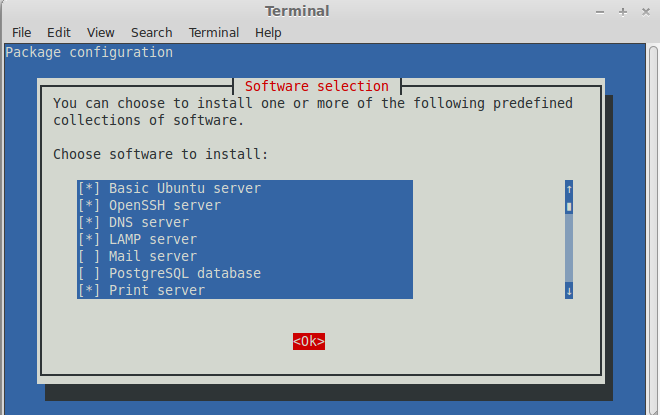
TASKSEL is a command which helps you to install top 20 servers in your PC. TASKSEL is by default installed in Ubuntu Servers, but we can install it in your PC also by using command sudo apt-get install tasksel .
Fig:- Installing tasksel
After installing tasksel you can view it’s manual page also on terminal by typing man tasksel. When you use tasksel command in terminal it will show you all the top 20 server names. To install those servers use space button to select your server, then click on OK button and those servers that you have selected for installation they will start installing in your system. This is a easier way to install servers on your system, I hope it will help you.
Fig :- Installing Selected Servers

Saturday, August 24, 2013

XAMPP: A web server package

XAMPP is a cross platform web server package. Cross platform means it works on every possible operating system without any compatibility issues. XAMPP is the acronym for: X-cross platform, A- Apache HTTP server, M- MySQL, P-PHP, P- Perl. The main advantage of XAMPP is that it requires very less configuration for its components, which make it quite user friendly. The default FTP user for XAMPP is "newuser", and default FTP password is "wampp". Similarly default MySQL user is "root", and there is no default password for MySQL.
XAMPP contains its own XAMPP Control Panel, where all the modules and their current status is given. We can very easily start or stop any module which we want, by clicking on "Action" button beside modules. We can even configure the modules. A small pop-up screen appears when we click on "config" button.
There is one main config button on top right side.  When we click on that main config button on top right corner then the following window will appear.
Below all this modules there is a terminal which displays the actions and generate a log file which we can view by clicking on logs. There are several different XAMPP distributions, 1. XAMPP for Linux, 2. XAMPP for Windows, 3. XAMPP for Mac OS X, 4. XAMPP for SOLARIS. Installing XAMPP is also very simple task in windows 8 just download the zip file and extract it and double click on .exe file. The folder name xampp will be created in C drive. So basically XAMPP is very user friendly and easy to use cross platform web server.

XAMPP is developed by Apache Friends and the Official website for XAMPP is  www.apachefriends.org/en/xampp.html